The technical SEO audit we run before writing a single line of code
A rebuild is the cheapest moment to fix crawl waste, and the most expensive moment to create it. Here is the eleven-point audit we run in week one, with the exact commands.

Most redesign projects treat SEO as a launch-week checklist. By then the information architecture is fixed, the URLs are decided, and the only thing left to do is ship redirects and hope. The audit belongs at the start, when its findings can still change the build.
1. What is actually indexed
Start in Search Console, not in a crawler. The Pages report tells you what Google has and — more usefully — what it has decided not to keep. The categories that matter:
- Crawled, currently not indexed. Google saw it and judged it not worth storing. Usually thin, duplicated, or orphaned.
- Discovered, currently not indexed. Google knows the URL but has not spent budget on it. A sign of crawl-budget waste elsewhere.
- Duplicate, Google chose a different canonical. Your canonical tags are being overruled.
On one property we audited, 4,000 listings had 800 indexed. The other 3,200 sat in "Discovered". The cause was a faceted-search system generating 90,000 crawlable filter combinations that consumed the entire crawl allowance.
2. Crawl the site as a bot sees it
# Quick coverage sweep from the sitemap
curl -s https://example.com/sitemap.xml \
  | grep -oP '(?<=<loc>)[^<]+' \
  | head -500 \
  | xargs -P 8 -I{} sh -c 'echo "$(curl -o /dev/null -s -w "%{http_code} %{time_total}" {}) {}"' \
  | sort -n
You are looking for three things: non-200 responses inside your own sitemap, response times above 600ms, and pages that redirect. A sitemap full of redirects tells Google your sitemap is stale, and it will trust it less.
3. Render, not just fetch
Fetch the HTML without JavaScript and check whether the content is there:
curl -s https://example.com/product/example | grep -c "<h1"
If the count is zero, your content depends on client-side rendering. Google can render JavaScript, but it does so in a second pass on a budget, and the delay is measured in days on large sites. Server-render anything you want indexed promptly.
4. One URL per piece of content
The classic duplicates: http and https, www and bare, trailing slash and not, uppercase and lowercase, and query parameters that change nothing. Each variant that returns 200 splits your signals. Pick one canonical form, 301 everything else, and make the canonical tag self-referential on every page.
5. Canonical tags that agree with the sitemap
Every URL in the sitemap should canonicalise to itself. Where a page canonicalises elsewhere, it should not be in the sitemap. Contradictions here are one of the most common reasons Google ignores canonical hints entirely.
6. Internal links, counted
Export your crawl and count inbound internal links per URL. The distribution is almost always wrong: the homepage has thousands, the top-of-funnel blog posts have three, and the pages that make money have none. Fix this in the build with contextual links from content to service pages, not by dumping a link list in the footer.
7. Structured data that matches the page
Validate with the Rich Results Test, then check the thing the validator will not: whether the markup describes what a human sees. Prices in Product markup that differ from the displayed price, AggregateRating on a page with no visible reviews, and FAQPage on a page with no visible FAQ are all manual-action territory.
8. Core Web Vitals, from field data
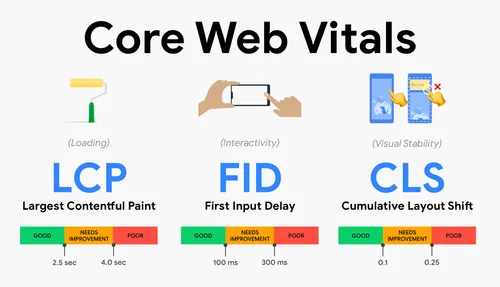
Pull the 28-day origin summary. Note the split between mobile and desktop — mobile is what ranks, and it is usually two seconds worse. Set the target before the design starts: it is far cheaper to design for a 1.2s LCP than to retrofit one.
9. Log files, if you can get them
Server logs show what Googlebot actually requested, how often, and what it got back. Twenty percent of crawl spent on parameter URLs, or on a paginated archive 40 pages deep, is twenty percent not spent on your service pages. This is the single most under-used data source in SEO, and it takes an afternoon.
10. The redirect map, built before the build
Every existing URL gets a row: current URL, status, monthly organic sessions, target URL on the new site. Pages with traffic get a one-to-one match. Pages without get a considered decision — merge, redirect to the parent, or let them 404 deliberately.
Redirect chains are the trap here. A → B → C loses a little on each hop and wastes crawl. Flatten every chain so each old URL points directly at its final destination.
11. A baseline you can be judged against
Before launch, record: indexed page count, organic sessions and conversions for the last 90 days, top 50 queries with position and clicks, and field Core Web Vitals. Without this you cannot tell a migration problem from a seasonal dip, and you will spend the first month after launch arguing about it.
What this costs
The audit takes us about a week and produces a document, a redirect map and a prioritised fix list. On a rebuild it usually changes the sitemap, the URL structure and two or three templates — all of which are free to change in week one and expensive to change in week ten.
If you are planning a rebuild, send us the current site. We will tell you what it is currently ranking for and what a move would put at risk.
Written by
Nabin Gurung
Head of Growth
Part of the four-person team at nlogn. We publish what we learn on client work — the numbers included.